There seams to be a problem in MSBuild when you add an “Accessor” as part of a Unit Test project.
C:Program FilesMSBuildMicrosoftVisualStudiov9.0TeamTestMicrosoft.TeamTest.targets(14,5): error MSB4018: The "BuildShadowTask" task failed unexpectedly.
System.IO.FileLoadException: API restriction: The assembly 'file:///C:WINDOWSMicrosoft.NETFrameworkv2.0.50727System.Web.dll' has already loaded from a different location. It cannot be loaded from a new location within the same appdomain.
   at System.Reflection.Assembly._nLoad(AssemblyName fileName, String codeBase, Evidence assemblySecurity, Assembly locationHint, StackCrawlMark& stackMark, Boolean throwOnFileNotFound, Boolean forIntrospection)
   at System.Reflection.Assembly.nLoad(AssemblyName fileName, String codeBase, Evidence assemblySecurity, Assembly locationHint, StackCrawlMark& stackMark, Boolean throwOnFileNotFound, Boolean forIntrospection)
   at System.Reflection.Assembly.InternalLoad(AssemblyName assemblyRef, Evidence assemblySecurity, StackCrawlMark& stackMark, Boolean forIntrospection)
   at System.Reflection.Assembly.InternalLoadFrom(String assemblyFile, Evidence securityEvidence, Byte[] hashValue, AssemblyHashAlgorithm hashAlgorithm, Boolean forIntrospection, StackCrawlMark& stackMark)
   at System.Reflection.Assembly.ReflectionOnlyLoadFrom(String assemblyFile)
   at Microsoft.VisualStudio.TestTools.UnitTesting.Publicize.WebBinder.LoadData()
   at Microsoft.VisualStudio.TestTools.UnitTesting.Publicize.WebBinder.Init()
   at Microsoft.VisualStudio.TestTools.UnitTesting.Publicize.Shadower..ctor()
   at Microsoft.VisualStudio.TestTools.BuildShadowReferences.BuildShadowTask.Execute()
   at Microsoft.Build.BuildEngine.TaskEngine.ExecuteInstantiatedTask(EngineProxy engineProxy, ItemBucket bucket, TaskExecutionMode howToExecuteTask, ITask task, Boolean& taskResult)
An Accessor allows your test project to access code that would normally be “Private” or “Friend” from outside the Assembly that it resides in.

It creates a little file with the “.accessor” extension that is the same name as your DLL, and contains the name of the DLL.
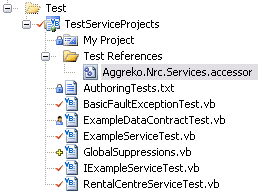
If you remove this file then your remote MSBuild server will then build you solution successfully again including running your Unit Tests.
Reference:
Re: BuildShadowTask Failed unexpectedly - Accessor Problem (Upconvert VS 2005 to 2008) – URGENT
BuildShadowTask Failed unexpectedly - Accessor Problem (Upconvert VS 2005 to 2008) – URGENT


